Key takeaways
- ManyChat has five plans: Free ($0, 25 active contacts a month), Essential ($17 a month), Pro ($39), Business ($99) and Advanced ($199). Billed yearly, the paid plans cost $14, $29, $69 and $139 a month.
- An active contact is a person who interacts with your account in the month. Past your plan’s allowance, each extra one is billed automatically, $0.05 on Pro, unless you set a cap.
- Manychat AI is included from Pro, where it used to be a $29 add-on. WhatsApp also starts at Pro, and Meta’s message fees are paid on top from a prepaid wallet.
- Automation-only alternatives cost about $12 to $20 a month. WhatSetter Social costs $29 a month with unlimited contacts, and adds an AI agent that qualifies the lead and books the appointment.
On this page
- ManyChat plans and prices in 2026
- What is ManyChat?
- What an active contact is, and why your bill moves
- Is ManyChat free?
- Is Manychat AI included?
- The costs on top of the plan
- Which ManyChat plan do you need?
- ManyChat alternatives, compared on price
- Why we built WhatSetter to replace ManyChat on Instagram
- How to switch from ManyChat
- Questions, answered.
ManyChat is free until 25 people talk to your account in a month. After that, what you pay depends less on the plan you pick than on how many people your posts bring in. That is the part most pricing pages skip, and the one that surprises people the month a reel takes off.
ManyChat costs $0 on the Free plan (25 active contacts a month), $17 a month on Essential (250), $39 on Pro (2,500, with Manychat AI), $99 on Business (7,500) and $199 on Advanced (25,000). Billed yearly, the same plans cost $14, $29, $69 and $139 a month. Past the allowance, every extra person is billed, from $0.10 each on Essential to $0.004 on Advanced.
Below: every plan and what it includes, how active contacts move your bill, what is free and what costs extra, which plan fits which use, and the alternatives, checked on each tool’s own pages on 13 November 2026.
ManyChat plans and prices in 2026
ManyChat changed its pricing on 2 March 2026 for new accounts, and is moving older accounts to it country by country. The five plans differ by the number of active contacts they include, the price of each contact above that, the channels you can connect and the team seats. Manychat AI comes with Pro and above.
| Plan | Monthly | Billed yearly | Active contacts a month | Each extra contact | Channels and users | Manychat AI |
|---|---|---|---|---|---|---|
| Free | $0 | $0 | 25 | Not available | 2 channels, 1 user | No |
| Essential | $17 | $14 a month ($168 a year) | 250 | $0.10 | 2 channels, 2 users | No |
| Pro | $39 | $29 a month ($348 a year) | 2,500 | $0.05 | 3 channels, 3 users | Yes |
| Business | $99 | $69 a month ($828 a year) | 7,500 | $0.025 | All channels, 5 users | Yes |
| Advanced | $199 | $139 a month ($1,668 a year) | 25,000 | $0.004 | All channels, 10 users | Yes |
Prices are in US dollars, before tax, and the extra contact prices are those of the monthly plans: on yearly plans they are a little lower ($0.082, $0.038, $0.018 and $0.0028), still counted and billed every month. Yearly plans save 18 % on Essential, 25 % on Pro and 30 % on Business and Advanced, and are paid upfront for the year. ManyChat also says the price depends on your billing country, so the checkout may show other amounts.
What is ManyChat?
ManyChat is a chat marketing tool. It sends automated messages on Instagram, Facebook Messenger, WhatsApp, TikTok, Telegram, SMS and email, with flows you build in a visual editor. Its best-known use is on Instagram: someone comments a keyword under a post, and ManyChat sends them a private message with a link. It connects to Instagram through Meta’s official API, like every serious tool of its kind.
It answers your leads in seconds, qualifies them and books the call, 24/7.
Try 7 days freeTalk to our agentWhat an active contact is, and why your bill moves
ManyChat counts an active contact for every person who interacts with your account through ManyChat during the billing month: someone who writes to you, comments on a post that triggers a flow, replies to a story, or receives a message from your automations, your broadcasts or your inbox. One person counts once, whatever the number of messages. The count starts again every month, even on a yearly plan, and deleting contacts does not lower it. Your followers are not contacts until they interact.
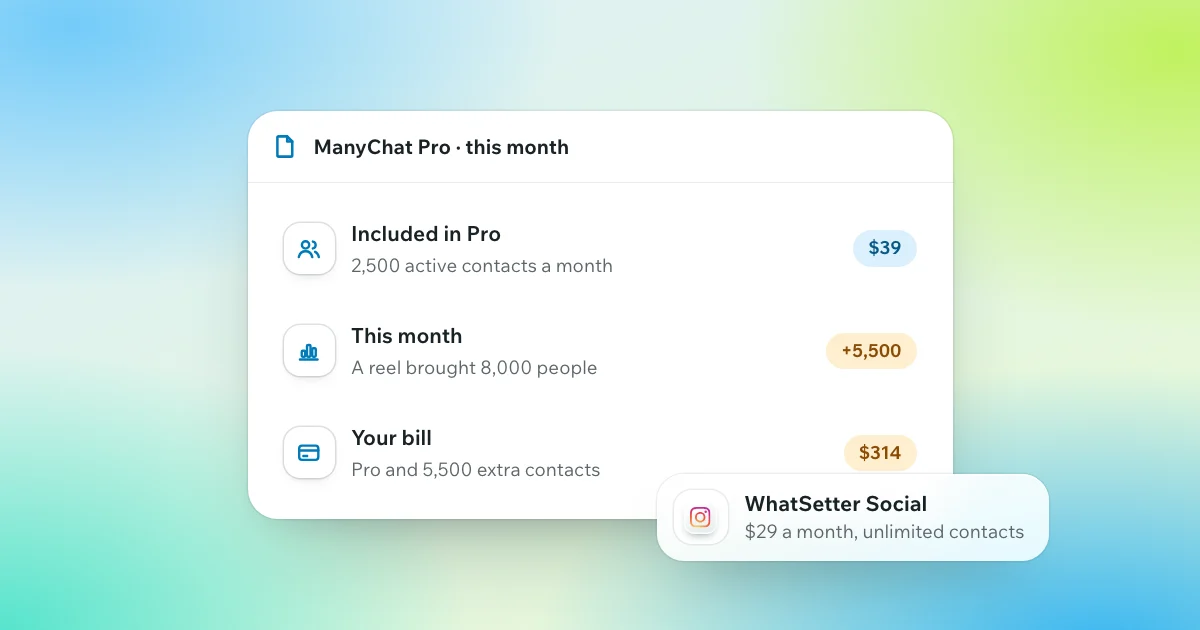
That is what makes the bill hard to predict on Instagram. It follows your reach, not your sales: a reel that pulls 8,000 people into a comment automation makes 8,000 active contacts that month, whether they buy or not. ManyChat warns you at 70 %, 90 % and 100 % of your allowance, then bills each extra person on your next invoice. If you move up a plan within the same month, that month’s extra contacts are waived. Here is what a month costs on the monthly prices:
| People your posts bring in that month | Staying on Pro | The cheapest ManyChat plan that month | WhatSetter Social |
|---|---|---|---|
| 2,500 | $39 | Pro: $39 | $29 |
| 5,000 | $164 | Business: $99 | $29 |
| 10,000 | $414 | Business and 2,500 extra contacts: $161.50 | $29 |
You can also set a contact limit in ManyChat’s billing settings. Then the bill stops growing, and so do the conversations: past the limit, only the people already counted that month keep getting your automations, and the next commenters get nothing.
Most months are quiet, and the plan you chose covers them. The month a post takes off is the one that costs. On WhatSetter’s own Instagram account, one reel brought more than 10,000 Instagram and Facebook messages in October 2026; the full story is in our use cases. With a price per person, a month like that is billed by the crowd, not by the customers in it. WhatSetter Social stays at $29: its contacts and automations are unlimited, and its AI agent writes 500 replies a month, with packs if you need more.
Is ManyChat free?
Yes, up to 25 active contacts a month. The Free plan connects two channels among Instagram, TikTok, Messenger and Telegram, runs up to 4 automations at a time for 1 user, and adds “Powered by Manychat” to the first message each person receives. WhatsApp, SMS and email are not available on it, and neither is the AI. It needs no credit card.
The old Free plan covered 1,000 contacts in total; the new one covers 25 a month, and ManyChat itself calls it a trial tier. It is enough to learn the tool and test a comment-to-DM flow. A post with real reach goes past 25 people within hours. To test the paid plans, Essential and Pro come with a 14-day free trial, with a card, once per channel: an Instagram account that already had a trial cannot get another. Business and Advanced have none.
Instagram’s own settings, which send prepared answers to everyone for free, are covered in our guide to Instagram auto reply.
Is Manychat AI included?
Yes, from the Pro plan. Manychat AI used to be an add-on at $29 a month on top of Pro; since the 2026 pricing it is included in Pro, Business and Advanced, and Free and Essential have none. It covers AI replies in DMs and comments, a knowledge base the AI answers from, AI steps inside flows and intent recognition, so a question that does not match a keyword no longer hits a dead end. ManyChat’s help centre says AI replies work on Instagram only for now, and are still in beta.
What it does not do is book the appointment. ManyChat lists no calendar among its integrations: the AI can qualify a lead and send your booking link, and the booking happens on the calendar’s own page, or through Zapier or Make.
The costs on top of the plan
- Extra contacts. Billed automatically past your allowance, from $0.10 each on Essential to $0.004 on Advanced, unless you set a limit.
- WhatsApp messages. WhatsApp needs Pro or above. ManyChat connects it through Meta’s Business Platform, and Meta’s fees for template messages, and since 1 October 2026 for replies beyond 1,000 a month per number, are paid from a prepaid ManyChat wallet. When the wallet is empty, the automations that need it pause. Our guide to WhatsApp Business API pricing gives Meta’s rates.
- Inbox seats. On Pro and above, each extra seat in the shared inbox costs $25, up to 3 seats on Pro, 5 on Business and 10 on Advanced. More users or channels than your plan allows means the next plan.
- SMS and email. SMS is billed by Twilio, not ManyChat. Emails beyond your plan’s allowance cost $0.003 each.
- Tax. The prices exclude it.
Refunds are limited: ManyChat refunds a first purchase cancelled within 30 days, and a technical problem on its side, at its discretion. A yearly plan cannot be downgraded or switched to monthly before its year ends.
Which ManyChat plan do you need?
- You are testing: Free, to build a first comment-to-DM flow and see how it works.
- A small account with one funnel, no AI: Essential, for up to 250 people a month.
- You want the AI or WhatsApp: Pro, with 2,500 active contacts a month. Watch the count the month a post takes off, and move up before the end of the month if it does.
- A team or an agency: Business or Advanced, for more contacts, seats and every channel.
ManyChat alternatives, compared on price
The alternatives fall into two groups: automation tools that send the link for less, and tools that put an AI behind the automation. Each price below was read on the tool’s own pricing page on 13 November 2026; SendPulse and Inrō showed euros to a visitor from France.
| Tool | Free plan | Entry paid plan | What the bill grows with | AI that answers | Books the appointment |
|---|---|---|---|---|---|
| WhatSetter Social | No | $29 a month ($23 billed yearly) | Nothing: contacts and automations are unlimited; 500 AI replies a month, then packs | Yes, included | Yes, in your calendar, inside the chat |
| Chatfuel | No | $20 a month ($18 billed yearly) | AI replies, from monthly credits ($20 included, about $0.0093 a reply) | Yes, from credits | Yes |
| SendPulse | Up to 500 subscribers | €11 a month (€8.80 billed yearly) | Subscribers | With your own AI provider’s key, after 200 free requests | Not listed |
| LinkDM | 1,000 DMs a month | $19 a month ($182 a year) | DMs sent and accounts | Not listed | Not listed |
| Inrō | 100 active contacts a month | From €12.99 a month | Active contacts | Yes, included | Sends your booking link |
| CreatorFlow | 500 DMs a month | $15 a month ($12 billed yearly) | DMs sent, then packs | Not listed | Not listed |
- LinkDM and CreatorFlow are the cheapest way to send comment-to-DM links. They bill by DMs sent, not by people, so a busy month costs the same until you reach the DM limit; CreatorFlow then pauses sending or sells packs. Neither lists an AI that answers.
- Inrō works like ManyChat on Instagram only: it bills by active contacts, with an AI agent included that answers and sends your checkout or booking link.
- SendPulse covers the most messaging apps, from WhatsApp to Viber and Telegram, and bills by subscribers. Its AI runs on your own AI provider’s key after 200 free requests, with the usage billed by that provider.
- Chatfuel has no free plan and no price per contact. Its AI answers and books meetings, and the bill grows with AI replies, paid from monthly credits.
- WhatSetter Social runs the same Instagram and Messenger automations with unlimited contacts, then an AI agent qualifies the lead and books the appointment in your calendar.
When ManyChat is the better choice. If you mostly send a link or a freebie, need TikTok, Telegram, SMS or email next to Instagram, or want a large library of templates, ManyChat does that well, and its free plan lets you start at no cost. The case for an alternative starts when your bill grows with your reach, or when the people in your DMs ask questions before they buy.
Why we built WhatSetter to replace ManyChat on Instagram
We built WhatSetter’s Instagram side to replace ManyChat for businesses whose DMs are leads: the same automations, rebuilt, plus an AI agent that takes the conversation to the appointment.

- The same triggers. A comment, a keyword in a DM, a story reply or mention, an ig.me link, with a button, a public reply under the comment, a follow or an email asked before the link, and one follow-up before Instagram’s 24 hours close.
- Then the agent. It answers the next question from your site and your knowledge, asks your qualifying questions and books the call in Calendly, Cal.com, GoHighLevel or iClosed, without sending the lead anywhere. If you reply yourself, even from the Instagram app, it steps back for that person.
- No price per contact. Automations are unlimited and never count; only the agent’s replies do, 500 a month in Social, with packs if you need more.
The same automations answer your Facebook Page’s comments and Messenger, and every conversation lands in one inbox. Our WhatSetter vs ManyChat page puts the two side by side.
The Instagram automations you know, plus an AI setter that books the appointment. WhatSetter Social covers Instagram and Messenger: unlimited automations and contacts, one AI agent and 500 AI replies a month, for $29 a month, or $23 billed yearly. See WhatSetter Social
How to switch from ManyChat
- Connect Instagram, and your Facebook Page if you use Messenger. In two clicks, through Meta’s official API: you log in on Instagram itself, so WhatSetter never sees your password.
- Rebuild your automations. Start from a model or from scratch: the triggers are the same, so each ManyChat flow has its WhatSetter automation.
- Build your agent. From your website and your sales script: it writes its own prompt, first message and follow-ups, then you set your criteria and your calendar.
- Import your contacts if you need them, from a file or the API. The conversations of your old tool stay there.
Turn each ManyChat automation off before you turn its WhatSetter version on, so nobody gets two messages, then cancel ManyChat on its website: the mobile app cannot do it. The switch page has the details, and our One-time setup can do it for you.
Questions, answered.
How much does ManyChat cost per month?
$0 on the Free plan, then $17 a month on Essential, $39 on Pro, $99 on Business and $199 on Advanced, or $14, $29, $69 and $139 a month billed yearly. Each plan includes active contacts, from 25 to 25,000 a month, and each extra person is billed, from $0.10 on Essential to $0.004 on Advanced.
Is ManyChat free?
Yes, up to 25 active contacts a month, on two channels among Instagram, TikTok, Messenger and Telegram, with up to 4 automations and ManyChat’s branding. WhatsApp, email, SMS and the AI need a paid plan.
What does 25 active contacts mean on ManyChat?
That the Free plan covers 25 people a month: those who write to your account, comment on a post that triggers a flow, or receive a message from your automations. Each person counts once a month, and the count starts again the next month.
Is Manychat AI included in the Pro plan?
Yes. Since ManyChat’s 2026 pricing, Manychat AI is included in Pro, Business and Advanced, where it used to be a $29 add-on. Free and Essential have no AI.
Does ManyChat charge for WhatsApp messages?
WhatsApp needs Pro or above, and Meta’s fees come on top: template messages, and since 1 October 2026 replies beyond 1,000 a month per number, are paid from a prepaid ManyChat wallet.
Is there a ManyChat coupon or discount?
No public coupon. The official discount is yearly billing: 18 % off Essential, 25 % off Pro and 30 % off Business and Advanced. A ManyChat partner’s referral link can also add a discount at checkout.
How do I cancel my ManyChat subscription?
On ManyChat’s website: the mobile app cannot cancel it. Your plan runs until the end of the period you paid for, and extra contacts already used are still billed. A first purchase cancelled within 30 days can be refunded.
What is the best ManyChat alternative?
It depends on what happens after the first message. For a link or a freebie, LinkDM or CreatorFlow cost less and do not bill by contact. For DMs that are leads, WhatSetter runs the same Instagram automations, then an AI agent qualifies the lead and books the appointment, for $29 a month with unlimited contacts.
Something else? Write to us, or ask our agent on WhatsApp.
Words used in this article