Without WhatSetter
A link, then silence.
- A booking link sends the lead out of the conversation.
- The back-and-forth over times takes days.
- Some calendars need an email nobody asked for.
- Rescheduling means starting over.
Features
Learn
Company
Appointment booking
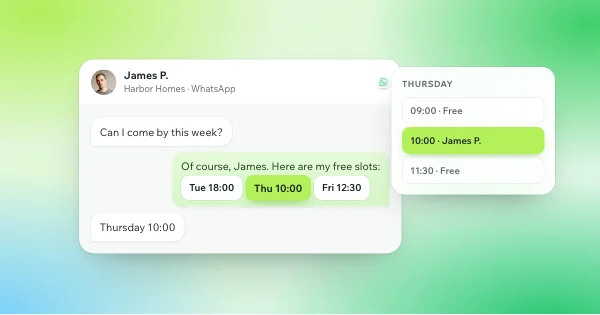
Your agent offers real free slots from your calendar, books the one the lead picks and confirms it, all inside the conversation, on WhatsApp, Instagram or Messenger.
7 days on your real numberCancel anytime5/5 on every Trustpilot review
Why it matters
Without WhatSetter
With WhatSetter
How it works
The part where most leads drop off, handled for you.
01
Calendly, Cal.com, GoHighLevel and iClosed connect directly. Google Calendar and Outlook work through Calendly or Cal.com. With any other tool, the agent sends your booking link.
02
The agent offers 3 free slots (from 1 to 5, you choose) and checks them again just before booking, so a slot taken in the meantime is never booked twice.
03
Video, phone or in person: the lead knows what they are booking, and a one-sentence rule can choose between two types. When your calendar needs an email, the agent asks for it, and nudges gently if it doesn’t come.
04
A lead who can’t make it changes the time in the chat. The old appointment stays booked until the new one is confirmed, so nothing is lost on the way.
Included
Calendly, Cal.com, GoHighLevel and iClosed; Google Calendar and Outlook through Calendly or Cal.com.
The agent sends your own booking link at the right moment.
Asked for only when your calendar requires it, with a gentle nudge if the lead forgets.
Every booking sends a signed « appointment booked » event to your tools.
Mark each appointment attended or not, won or lost, on the lead’s record.
By agent, list or source, in your analytics.
FAQ
Straight answers to what people ask before they start.
Something else? Write to us, or ask our agent on WhatsApp.
Calendly, Cal.com, GoHighLevel and iClosed connect directly. Google Calendar and Outlook work through Calendly or Cal.com. With any other tool, the agent sends your booking link.
Yes. For a webinar, a course or an event, WhatSetter sends the reminders on WhatsApp, scheduled from its date. For a call or a visit booked in your calendar, your calendar tool sends its own reminders by email or text.
Yes, in the chat. The old appointment stays booked until the new one is confirmed, so nothing is lost on the way.
Yes: video, phone or in person, announced to the lead. A one-sentence rule can choose between two types, for example in person for leads in Lisbon and video for everyone else.
More features
Connect your calendar and let your agent offer, book and move appointments for 7 days.
7 days on your real number · Cancel anytime · See the plans