Key takeaways
- On a professional account, Instagram’s free settings answer with up to four prepared questions, an automatic first message and an away message: the same words for everyone.
- Comment-to-DM tools send a private message when someone comments a keyword, replies to a story or opens an ig.me link, through Meta’s official API.
- Meta lets automated DMs reach only people who wrote, commented or replied first, within 24 hours of their last message, with one private reply per comment.
- A fixed auto reply delivers a link. WhatSetter runs the same automations, then an AI agent answers the next question, qualifies the lead and books the appointment, on Instagram and Messenger.
- On WhatSetter’s own Instagram account, one reel brought more than 10,000 Instagram and Facebook messages in October 2026, and the AI wrote 3,857 replies.
On this page
- Can you set an auto reply on Instagram?
- How to set up an auto reply in the Instagram app
- How to auto-reply to comments with a DM
- The rules Meta sets for automated DMs
- What happens when a post takes off
- Where a fixed auto reply stops, and an AI agent starts
- How to set up Instagram auto replies with WhatSetter
- Instagram auto reply examples you can copy
- Which one should you choose?
- Questions, answered.
A reel takes off on a Tuesday night. By Wednesday morning, hundreds of comments say “price”, the DMs are piling up, and the people who wrote at 11 pm have already moved on to the next account in their feed. Nobody answers that by hand, at least not fast enough.
An Instagram auto reply is a message your account sends without you typing it, when someone writes to you, comments on a post or replies to a story. Instagram’s free settings send the same text to everyone. Comment-to-DM tools send a private message when someone comments a keyword. An AI agent reads each message and answers it the way you would, all the way to the appointment.
Which one you need depends on what happens after the first message. Here is how each works, how to set it up, the rules Meta enforces, and what we saw when one of our own reels brought more than 10,000 messages in a month.
Can you set an auto reply on Instagram?
Yes, on a professional account, Business or Creator. A personal account has none of these settings, and switching is free in the app’s settings. Then you have three levels, and they do not solve the same problem.
| Option | What it does | Where it stops | Price |
|---|---|---|---|
| Instagram’s own settings | Up to four questions with prepared answers, an automatic first message and an away message | The same words for everyone: it cannot read a question, let alone answer it | Free |
| Comment-to-DM tools | A private message with a button when someone comments a keyword, replies to a story or opens an ig.me link | The flow ends on a link; a real question waits for a human | A free plan with limits, then about $10 to $40 a month, usually by number of contacts |
| WhatSetter: the automations plus an AI agent | The same comment-to-DM automations, then an agent that reads each reply, answers it, qualifies the lead and books the appointment | It works within what you allow; when you reply yourself, it steps back | Social: $29 a month, or $23 billed yearly, with no price per contact |
The first level is free and takes five minutes. The second is what creators use to turn comments into DMs. The third does both, for businesses whose DMs are leads: people who ask a question before they buy, book or sign up.
How to set up an auto reply in the Instagram app
Instagram gives professional accounts three free settings, and Meta Business Suite adds the automatic messages. None of them reads what people write: they send words you prepared in advance.
Frequently asked questions
Up to four questions that people see when they open a chat with you, each with an answer you write once. In the app: Messages, then the more actions icon, then Tools, then Frequently asked questions. Turn on “Show questions”, add your questions and their answers, and save. A tapped question lands in your message requests, so check them: you accept the request to carry on the conversation.
An automatic first message and an away message
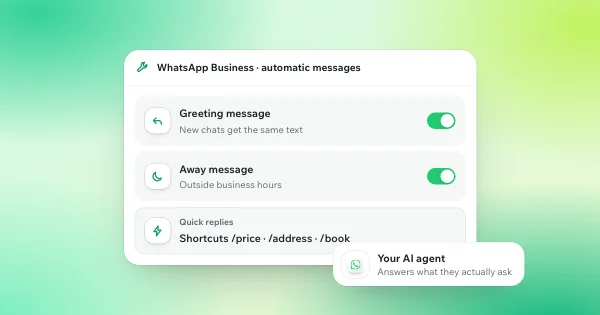
These two live in Meta Business Suite, on a computer: Inbox, then Automations, then Create automation. “Auto reply”, formerly “Instant reply”, greets someone who writes to you for the first time. “Away message” answers when you are not available. Both work for Instagram business accounts and send the same text every time. The same screen offers custom keywords: up to five words or phrases, matched exactly, capital letters included, and answered after 15 minutes. Meta also warns that some of these messaging features are not available everywhere, Europe included, so check that yours appear.
Saved replies
Not automatic, but the fastest way to answer by hand. Hold down a message you sent, tap More, then Save, and give it a shortcut: typing the shortcut inserts the whole message. Instagram can also suggest a saved reply while you type. You still tap send.
Scheduling a message
To send a DM at a set time, type it in the chat, then hold the send button and pick the date and time. It works for text only, and only you can see it until it goes out.
Turning them off
For the questions, turn off “Show questions” in the same Tools menu. For the automatic messages, go back to Inbox, then Automations in Meta Business Suite, and use the switch under “Status”. A tool connected to your account is turned off in the tool itself.
It answers your leads in seconds, qualifies them and books the call, 24/7.
Try 7 days freeTalk to our agentHow to auto-reply to comments with a DM
This is what most people mean by Instagram auto reply: someone comments a word under your post and gets a private message within seconds. Instagram cannot do it on its own. It takes a tool connected to your account through Meta’s official API, which is how ManyChat, WhatSetter and the others work.
Whatever the tool, the triggers are the same four:
- A comment: any comment, a word or an exact word, on one post, on the next ones or on all of them.
- A keyword in a DM: someone writes “program” or “price” in your messages.
- A story reply or a mention of your account in a story.
- An ig.me link: a link in your bio, a story or an ad that opens a conversation with your account.
The private message usually carries a button, the link people asked for, and you can post a public reply under the comment too, so the next readers see that the DM went out. Two options make it work better: a “follow to receive” condition, which asks people to follow you before the link arrives, and an email step, which collects an address before handing over a guide.
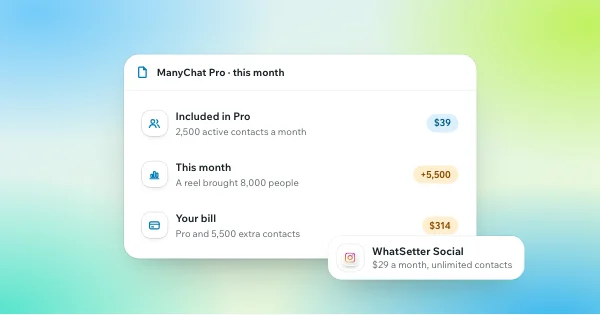
Check how the tool bills before a post takes off. Most automation tools count contacts, the people you interact with each month. ManyChat’s free plan covers 25 active contacts. Its Pro plan costs $39 a month, or $29 billed yearly, for 2,500 active contacts with its AI included, and each contact above that costs $0.05 more a month ($0.038 on the yearly plan). A reel that pulls in thousands of people is billed that month.
The rules Meta sets for automated DMs
Every tool that sends automated DMs works within the same limits, because they come from Meta’s API, not from the tool.
- The person writes first. A DM, a comment, a story reply or a click on an ad opens the conversation. There is no way to send a cold DM through the API.
- 24 hours to answer. Each message from the person opens a 24-hour window for automated replies. After a click on an ad that opens Instagram Direct, it can last up to 7 days. Once it closes, only a person may reply, within 7 more days, and never with a promotion.
- One private reply per comment. A comment can get one private message, within 7 days of the comment. The conversation goes on only if the person answers.
- 750 private replies an hour. That is Meta’s cap per account for replies to comments: a reel with thousands of comments is answered over a few hours, not all at once.
- A way to reach a person. Meta requires a path to a human, and asks automated chats to say they are automated where the law requires it. In the EU, the AI Act has required since 2 August 2026 that people be told when they are talking to an AI.
A tool connected through Meta’s official API works within these rules. A tool that asks for your Instagram password does not use the API at all.
What happens when a post takes off
On WhatSetter’s own Instagram account, a single reel brought more than 10,000 Instagram and Facebook messages in October 2026. When a post takes off, conversations come faster than any team can answer them. Automations opened each one, and the AI agent carried them on toward the appointment: 3,857 replies written by the AI, at whatever time people wrote. The full story is in our use cases.
A fixed auto reply would have sent the same lines to every one of those people, and the next message, the real question, would have waited for us. That is the gap an AI agent fills.
Where a fixed auto reply stops, and an AI agent starts
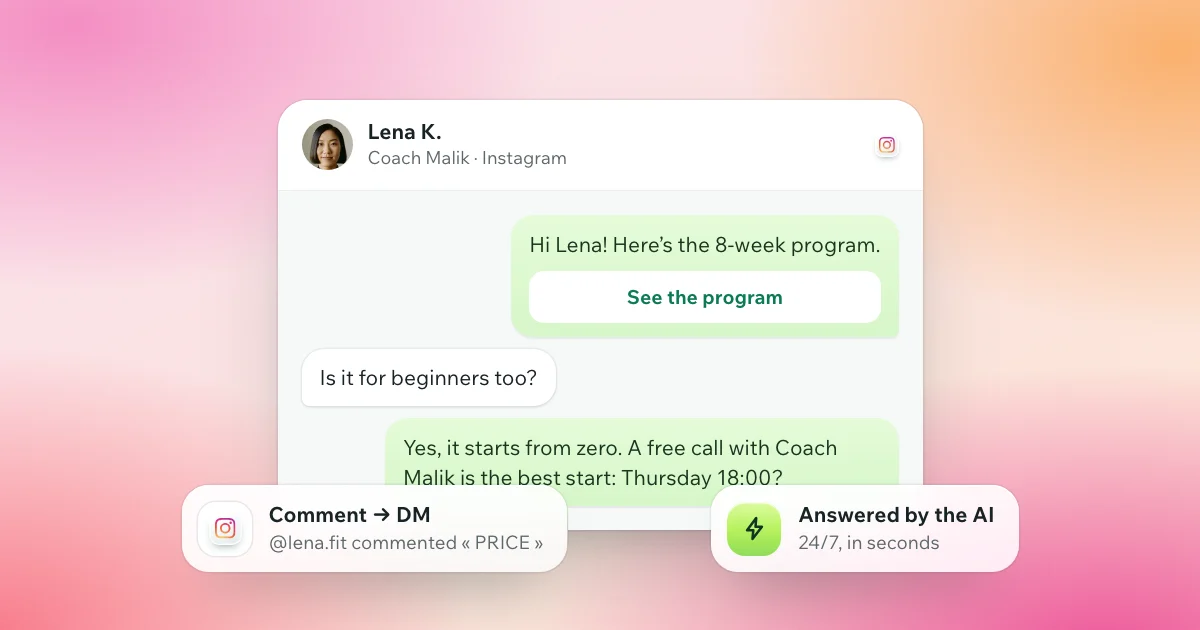
Take Lena, who comments “PRICE” under a fitness coach’s reel at 11 pm. Coach Malik is a fictional business; the conversation is a typical one.
With a comment-to-DM tool, she gets a private message with a button to the program. Then she has a question, and it waits for the coach to wake up:
“Thanks! Is it for beginners too?”
With an AI agent behind the automation, the answer arrives in seconds, and it moves the conversation forward:
“Yes, it starts from zero. A free call with Coach Malik is the best start: does Thursday at 6 pm work for you?”
Lena says yes. The agent books the call in the coach’s calendar and confirms it in the chat, and Lena moves to “appointment booked” in the inbox. If the coach replies himself, even from the Instagram app, the AI steps back for Lena. On the plans with WhatsApp, she can also leave her number and carry on there.
That is the whole difference: an automation delivers a link, an AI agent delivers an appointment. It answers in the lead’s language, among 43, asks your qualifying questions and sends one follow-up before the 24-hour window closes if the lead goes quiet.
How to set up Instagram auto replies with WhatSetter
We built WhatSetter’s Instagram side to replace the automation tools creators already use: the same triggers, rebuilt, plus an AI agent that takes the conversation from there. It works on Instagram and on Messenger, through Meta’s official API.
- Connect your account. In the dashboard, open Instagram and click Connect Instagram. You log in on Instagram itself, so WhatSetter never sees your password. To add Messenger, click Connect my Page: your Facebook Page must be linked to the same Instagram account.
- Create an automation. Start from a model, from one of your automations or from scratch, then fill in four steps: when it fires (a comment, a story reply, a mention, a keyword or your ig.me link), the message, the link or the guide, and what happens next.
- Choose who answers next. You, your agent after an automation, or your agent for every private message. The agent answers from its prompt and its knowledge, qualifies the lead and books the meeting in your calendar.
- Add the options you need. A public reply under the comment, a follow or an email asked before the link, and one automatic follow-up for someone who tapped your button and went quiet, before Instagram’s 24 hours close.
Two details matter on a busy account. When someone on your team answers by hand, from the inbox or from the Instagram app, the agent steps back for 1 hour, 24 hours or 3 days, then picks up again. And when the agent answers every DM, it leaves some messages aside on purpose: accounts you follow, personal messages, collaboration requests and customers with a problem wait for you, and spam is never answered.
With your Facebook Page linked, the same automations answer your Page’s comments and the agent answers in Messenger. Every conversation lands in the same inbox and the same leads as your WhatsApp ones. Automations are unlimited and never count; only the agent’s replies count in your plan’s AI replies.
The Instagram automations you know, plus an AI setter that books the appointment. WhatSetter Social covers Instagram and Messenger: unlimited automations and contacts, one AI agent and 500 AI replies a month, for $29 a month, or $23 billed yearly. See WhatSetter on Instagram
Instagram auto reply examples you can copy
Whatever sends them, good auto replies have the same shape: they answer something, then ask one question. Five to adapt to your business:
- Welcome: “Hi, thanks for writing! Is it about prices, availability or something else? Tell me and I’ll send you the right answer.”
- A price question: “The 8-week program costs €149 and starts every Monday. What is your goal? I’ll tell you if it fits.”
- After a comment: “Here’s the guide you asked for. One question: are you just starting, or already training?”
- A story reply: “Glad you liked it! Want the details of the next session?”
- Out of hours: “We’re closed right now. Our prices and hours are here. Leave your question and we’ll answer first thing tomorrow.”
Each one ends with a question, because a question gets a reply, and a reply is a conversation you can lead somewhere. With fixed replies, you answer that reply yourself. With an AI agent, it is answered in seconds.
Which one should you choose?
- A few DMs a week: Instagram’s own settings are enough. Save your answers, add a few questions, and reply to the rest yourself.
- Comment campaigns and a freebie to send: a comment-to-DM tool does the job. Check how it bills before a reel takes off.
- DMs that are leads, people who ask before they buy, book or sign up: an AI agent pays off. WhatSetter runs the same automations, then the agent answers in seconds, asks your qualifying questions and books the appointment, day and night.
If you are comparing tools, our WhatSetter vs ManyChat page puts the two side by side, and our ranking of the best AI appointment setters covers seven options, ours included. Leads who give their number can carry on with an AI setter on WhatsApp.
Questions, answered.
Can I set an auto reply on Instagram?
Yes, on a professional account. Instagram shows up to four questions with prepared answers, and Meta Business Suite sends an automatic first message and an away message. To answer comments with a DM, or to answer real questions, you need a tool connected through Meta’s official API.
Is there a free automation tool for Instagram DMs?
Instagram’s own settings are free. Comment-to-DM tools have free plans with limits: ManyChat’s covers 25 active contacts, and its paid plans bill by contact. WhatSetter Social costs $29 a month, with unlimited contacts and an AI agent that books appointments.
How do I turn off auto reply on my Instagram business account?
For the questions: Messages, then Tools, then Frequently asked questions, and turn off “Show questions”. For the automatic first message and the away message: Meta Business Suite, then Inbox, then Automations, and the switch under “Status”. A connected tool is turned off in the tool itself.
Can Instagram send a message automatically at a set time?
Yes, for text. Type the message in the chat, hold the send button and choose the date and time. Only you see it until it goes out, and you can send it now, copy it or delete it in the meantime.
Can WhatSetter replace ManyChat on Instagram?
Yes. WhatSetter runs the same Instagram automations: comments, keywords, story replies and mentions, ig.me links, with a button, a public reply, a follow or email step and a follow-up. Then an AI agent carries the conversation to the appointment. WhatSetter Social costs $29 a month with unlimited contacts, where ManyChat bills by active contact.
Is it allowed to automate Instagram DMs?
Yes, through Meta’s official API: to people who wrote to you, commented or replied to a story first, within 24 hours of their last message, with one private reply per comment. Meta also requires a way to reach a person. A tool that asks for your Instagram password works outside these rules.
Something else? Write to us, or ask our agent on WhatsApp.
Words used in this article